12 Stock off the shelf and the cut-off
For the owner and approvers
- How a count treats stock that is the shop’s but not on the shelf.
- What the cut-off is, and why sales during a count don’t look like losses.
- What happens when a movement is entered after its count was completed.
12.1 The idea
A count compares the shelf with the ledger at one moment. Two things make that moment hard to pin down in a real shop: some stock is away, and the shop stays open while it’s counted.
Stock that is away
Pieces on jangad, with the karigar, or kept for an order are the shop’s stock, but they aren’t on the shelf (Chapter 6). A count expects only what’s in the shop: owned stock minus what’s away. The rest is listed apart, so nobody mistakes it for a loss.
Customers’ own pieces, in for repair, are never the shop’s stock, wherever they sit.
The cut-off
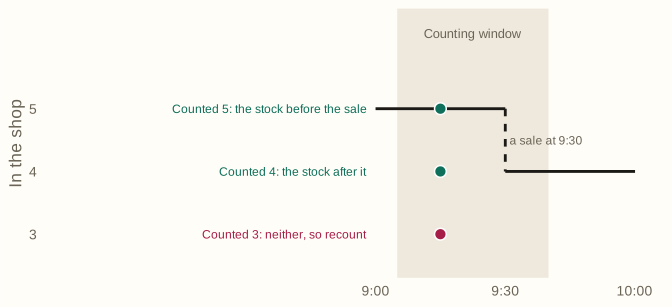
A count takes time. If a pair of jhumkas is sold at 9:30, and the jhumkas were counted between 9:05 and 9:40, which stock should the count be compared with: before the sale, or after?
Jholok works out a cut-off for every product in a count. It reads the activity log to find when that product was counted (its counting window), and compares the count with the stock in the shop at the end of that window. If stock moved during the window, it checks every stock figure along the way: if the count matches any of them, the count is fine. If it matches none, the product needs a recount.
So the shop never has to close for a count, and a sale in the middle of counting is never called a loss.
12.2 In the app
Stock off the shelf in Review
When stock in the count’s types is away, Review’s summary says so, such as “Off the shelf, not counted: 1 with the karigar”. Under the product, it says how many were away when it was counted, “not expected on the shelf”.
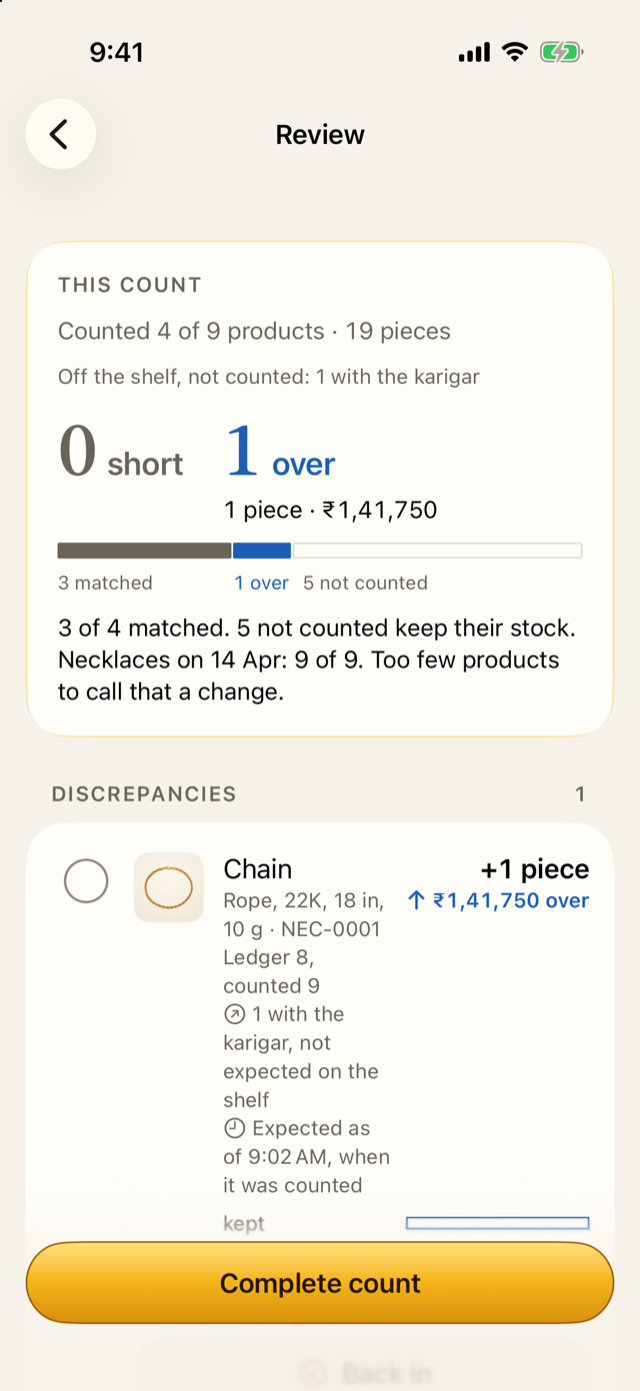
If a count finds more than expected while some are away, Review asks “did some come back?” and offers Back in, so a piece that came back without being recorded can be put right in the count.
After the count is completed, its Result and report list what was off the shelf when each product was counted.
Lines whose stock moved
Under a product counted before the counting ended, or recounted, Review says what its expected stock was taken from, such as “Expected as of 11:42, when it was counted”. A product whose count matches none of the stock figures during its window shows “Stock moved while counted”, and waits under Recount first with its numbers hidden, like a shortage (Chapter 13). After the recount, the recount’s own time becomes the cut-off.
Entries made after a count
Sometimes a sale is entered late, after the count that covered it was completed, but dated before the product was counted. If that count had already written the piece off as short, the shop would lose it twice: once in the count, and again in the sale.
Jholok spots this when you record the movement. The sheet says, for example: “This sale is dated before Showcase 2 counted Jhumka, which wrote 1 off as short. Jholok will put 1 back so it isn’t taken off twice.” For a sale, it asks for the bill number. Putting the piece back needs the owner, who confirms with Face ID or the owner PIN. The correction is a cut-off correction movement, logged with the sale.
If the owner doesn’t confirm, the sale can still be saved without the correction; the count then lists it as entered after completion, and its write-off stays.
The count’s Result and report list every entry made after completion, and the next Review of those types lists the corrections, so nothing changes a past count quietly.
12.3 Why it works this way
- What’s away isn’t lost. Counting it as short would write off stock the shop still owns.
- A shop doesn’t close for a count. The cut-off lets sales carry on during counting without spoiling it.
- A late sale shouldn’t count twice. The cut-off correction puts back what the count took off, and only for that sale.
- The owner decides corrections. Changing what a completed count did is serious, so it needs the owner’s proof, and it’s logged and listed.
12.4 How it works
For each product, the counting window runs from the first to the last time its count changed, as the activity log records. Expected stock is the stock in the shop at the window’s end. If movements fell inside the window, Jholok compares the count with the stock before each one and after it.
When every counted piece of a product had its tag read and the count has the books (Chapter 11), expected comes from the tags themselves: the pieces the books have on the shelf.
Completing a count freezes, for each product, its cut-off, how it was decided and how much was off the shelf. Later movements never change what the count compared.
12.5 Try it
In the screenshot above, a chain (Rope, 22K, 18 in, 10 g) went to Ramesh karigar on 24 Aug, memo K-17. When the chains were counted at Showcase 2, the shop owned 9 but had 8 on the shelf. The counter counted 9, so Review shows it 1 over, with “1 with the karigar, not expected on the shelf”.
One over, with one away: the likeliest story is that the chain came back from the karigar and nobody recorded it. Tapping Back in records it as back from when it was counted, and the line then matches.
Question. At 9:15 you count 6 pairs of hoops. At 9:20 a pair is sold. You finish the earrings at 9:40. Is the hoops’ count short?
TipAnswer
No. The hoops were counted at 9:15, before the sale, when the shop had 6. Their cut-off is 9:15, and your count matches the stock then. Had you counted 5, they would be one short: at 9:15 the sale hadn’t happened yet.
- A count expects what’s in the shop. Stock on jangad, with the karigar or kept for an order is listed apart, never as a loss.
- Each product’s cut-off is when it was counted. Sales during counting are fine if the count matches the stock at some point.
- A product whose stock moved and matches nothing is recounted.
- A movement entered late, dated before a completed count, gets a cut-off correction that the owner confirms.