11 Book stock
For the owner and approvers
- What “the books” are, and why a count can be checked against them.
- How to load them, and what the plan before loading tells you.
- What a count loaded with the books finds out about each tag.
11.1 The idea
Most jewellers’ billing software keeps its own list of every tagged piece in stock: the books. When a piece is billed, it drops off that list. Jholok’s ledger should agree, but a sale billed and not entered in Jholok, or a piece sent out and not recorded, makes them differ.
A count can be loaded with the books: you give Jholok the billing system’s list of tags in stock, and the time it was taken from. For the tagged products in the count, Jholok then expects what the books say, not what its own ledger says. Products with no tags keep Jholok’s own ledger. The count checks the stock against the system that bills the customers.
Because each tag names one piece, the books also make a count precise. When every piece of a product had its tag read, Jholok can name the exact tags the books have and the count didn’t find.
The file
The billing system’s export, saved as a CSV file, with:
- a tag column (also “Tag No”, “tag code” or “barcode tag”),
- a SKU column (also “Item Code”, “design” or “design code”),
- and optionally a status column (also “location” or “state”), saying where each piece is.
A blank status means the piece is on the shelf. Jholok knows the usual words for the other places: “jangad” or “approval”, “karigar” or “artisan”, “order” or “booked”, and “sold”. A word it doesn’t know, it asks the owner about, once, and remembers.
11.2 In the app
Load the books
On the counting screen, tap Load book stock. An approver or the owner signs in, then chooses the file.
Set As of to the time the file was taken from the billing system. Jholok suggests the time the file was saved.
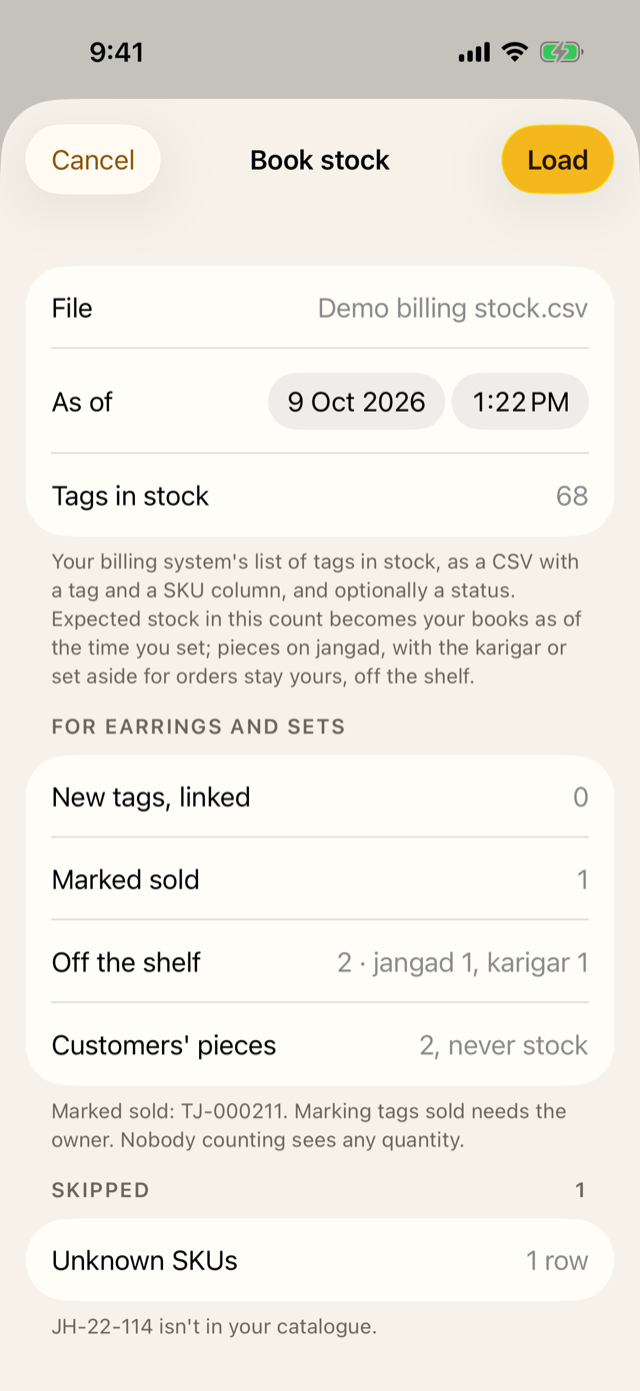
Before anything changes, the sheet shows a plan:
- how many tags the file has;
- for the count’s types, the new tags it will link;
- the pieces it will mark sold;
- the pieces off the shelf, and where;
- customers’ pieces;
- products with no tags, which keep Jholok’s ledger. Rows it can’t use are listed under Skipped, with the reason.
If the file uses a status word Jholok doesn’t know, the plan asks: “This file says”rep” for 14 rows. What does it mean?” The owner chooses one of On the shelf, Sold, Jangad, Karigar, Order or Customer’s piece, and taps Use this meaning. Jholok remembers the answer for every later file. The owner can change answers in Settings → Book stock words.
Tap Load. The counting screen then shows when the books are from.
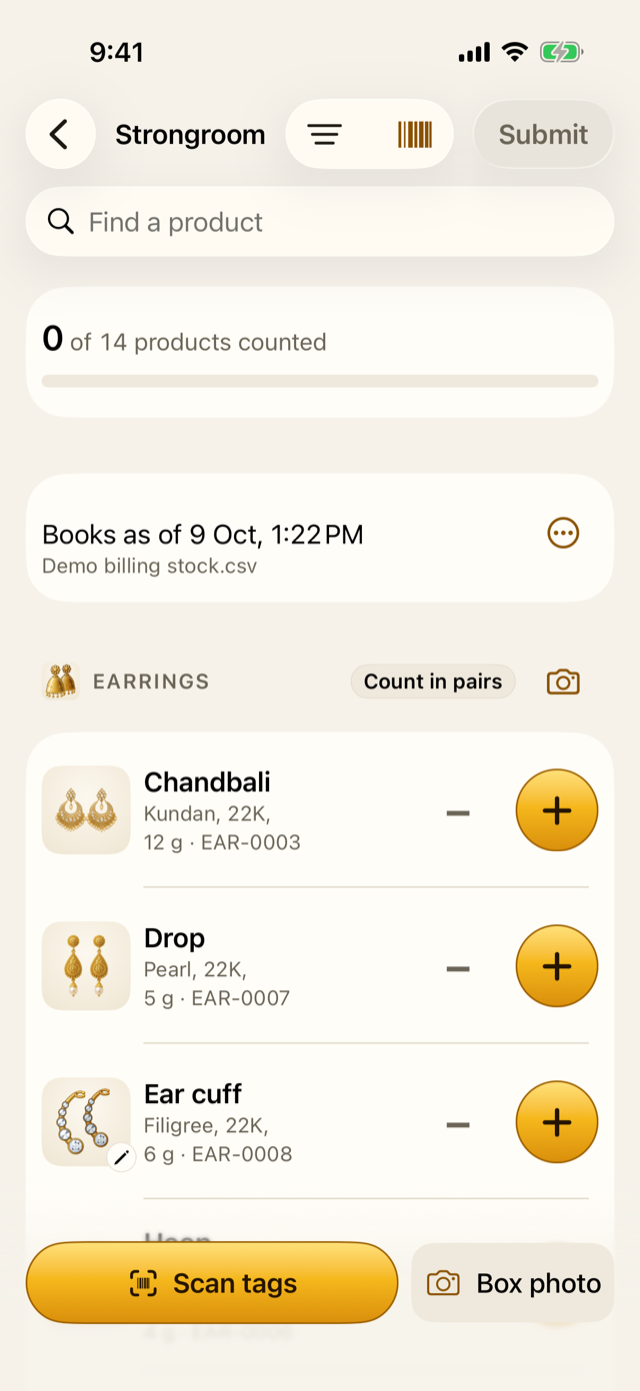
From the ⋯ beside it, Load newer book stock loads a later file, and Undo book load takes the latest load back while the count is open.
When the owner is needed
Three things need the owner, even when an approver is loading:
- Saying what a new status word means. Load stays off until every word has an answer.
- Marking pieces sold. A tag Jholok had in stock that isn’t in the file is marked sold, which takes it out of stock.
- A file that doesn’t look like the stock. The plan says so if loading would leave more than a tenth of the count’s tagged products with none. It also says so if more than one row in twenty matches nothing in the catalogue. Only the owner can Load anyway.
Before Review
If counting went on more than half an hour after the time the books are from, opening Review warns: “The books are older than the counting.” Pieces sold in between would look missing. Load newer books, or give a reason and Review anyway.
11.3 Why it works this way
- The books are the shop’s own record. Checking the stock against the billing system finds sales that never reached Jholok, and pieces that left the shop without a bill.
- The “as of” time matters. A piece sold after the file was taken isn’t missing; Jholok needs the time to tell the difference.
- Nobody counting sees a quantity. The plan shows tags and row counts, never a product’s stock, so loading the books doesn’t spoil a blind count.
- Marking sold, and odd files, need the owner, because both can take a lot of stock off Jholok’s ledger at once.
- Customers’ pieces are never stock. A piece in for repair may sit in the same tray; the books mark it, and Jholok never counts it.
11.4 How it works
Loading is one change, saved at once:
- For each tagged product in the count, and each place, Jholok records a Book stock movement: the books minus its own stock at the “as of” time. Stock is still a sum of movements, and now matches the books.
- Tags in the file that Jholok didn’t know are linked to their products by SKU. A tag Jholok already knows keeps its product.
- Each tag’s state is set: on the shelf, sold, or out at its place.
- The load is kept with a fingerprint of the file (its SHA-256), and logged.
The count’s first load sets the starting point. A later load during the count can show pieces sold during the count: on the shelf in the first file, gone from the later one.
What the count finds about each tag
When the count is completed, Jholok freezes what it found for each product, and Result, the report and the CSV list:
- Tags not found: in the books, not read in the count. These are named only for products where every counted piece had its tag read, so a missing tag really is missing. A product counted by hand says its tags weren’t checked.
- Sold during the count: dropped by a later load.
- Found, not in the books: read in the count, but the books don’t have them in stock.
- Out of the shop: read in the count, but recorded as out, on jangad, say.
11.5 Try it
This is the demo’s billing file, made from the demo’s tag list for the strongroom count’s types, Earrings and Sets. It starts like this:
| Tag No | Item Code | Status |
|---|---|---|
| TJ-000201 | EAR-0001 | |
| TJ-000202 | EAR-0001 | |
| TJ-000203 | EAR-0001 |
Most rows are tags on the shelf. Jholok doesn’t know the words “Appro” or “Rep”, so it asks the owner about each first. The table shows what happens after the owner answers Jangad and Customer’s piece:
| Tag No | Item Code | Status | What Jholok does |
|---|---|---|---|
| TJ-000214 | EAR-0003 | Karigar | Off the shelf, with the karigar |
| TJ-000222 | EAR-0004 | Appro | Off the shelf, on jangad (approval) |
| TJ-990001 | JH-22-114 | Skipped: a design not in the catalogue | |
| RP-0091 | Rep | A customer's piece: never stock | |
| RP-0093 | Rep | A customer's piece: never stock |
One tag Jholok has, TJ-000211 (EAR-0002), isn’t in the file at all. It has been billed, so loading marks it sold, which needs the owner. In the app’s plan above, that’s “Marked sold 1”, “Off the shelf 2 · jangad 1, karigar 1”, “Customers’ pieces 2, never stock”, and 1 row skipped for an unknown SKU.
Question. The books are from 10:00. Counting went on until 11:40, and Review warns that the books are older. What could go wrong if you review anyway?
TipAnswer
A piece sold between 10:00 and 11:40 is still in the 10:00 books, but wasn’t on the shelf to be counted, so it would look missing. Load newer books from the billing system, or, if nothing was sold in that time, give that as the reason and review anyway.
- The books are the billing system’s list of tags in stock, as of a time.
- Loading them makes the count’s expected stock the books, for products that have tags. Nothing is changed until you’ve seen the plan.
- Marking pieces sold, and a file that doesn’t look like the stock, need the owner.
- With every tag read, the count names exactly which tags are missing.