6 Recording what comes in and goes out
For the owner and approvers
- How to record a delivery, a sale and a return.
- How to put a wrong stock figure right.
- How to send stock out to jangad, the karigar or an order, and bring it back.
6.1 The idea
Between counts, the ledger stays right only if every movement is recorded: each delivery, each sale and each return. The billing system may record sales too; Jholok needs them as well, because its stock is the sum of its own movements (Chapter 2).
Three habits keep it right:
- Record it when it happens, or as soon as you can, with the date it really happened.
- Never fix a figure by guessing. If the stock is wrong, find out why. If you can’t, count the product.
- Write a note when it will help someone later: the supplier, the bill number, why a piece was taken out.
Stock that leaves the shop for a while
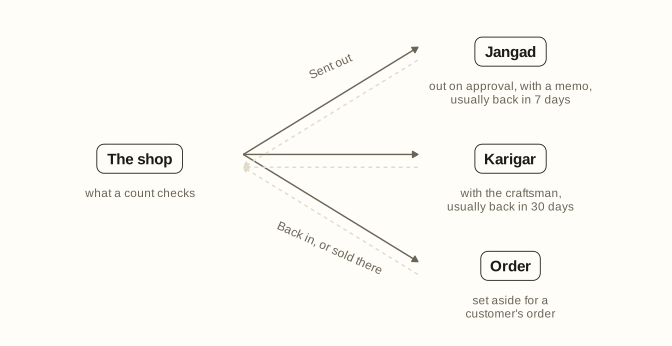
Not all stock is on the shelf. Jewellers often send pieces out and expect them back:
- Jangad: pieces sent out on approval, with a memo, for a customer or another jeweller to see.
- Karigar: pieces with the craftsman, for repair or alteration.
- Order: pieces set aside for a customer’s order.
These pieces are still the shop’s: they count in its stock and its value. But they aren’t on the shelf, so a count mustn’t expect them there. Jholok keeps them apart: a product shows how many are in the shop and how many are off the shelf.
6.2 In the app
Receive, sell and return
Open the product and tap Receive or Sell. You can also tap + in the Ledger and choose the product, or, when no sales are recorded yet, tap Record a sale on the Overview.
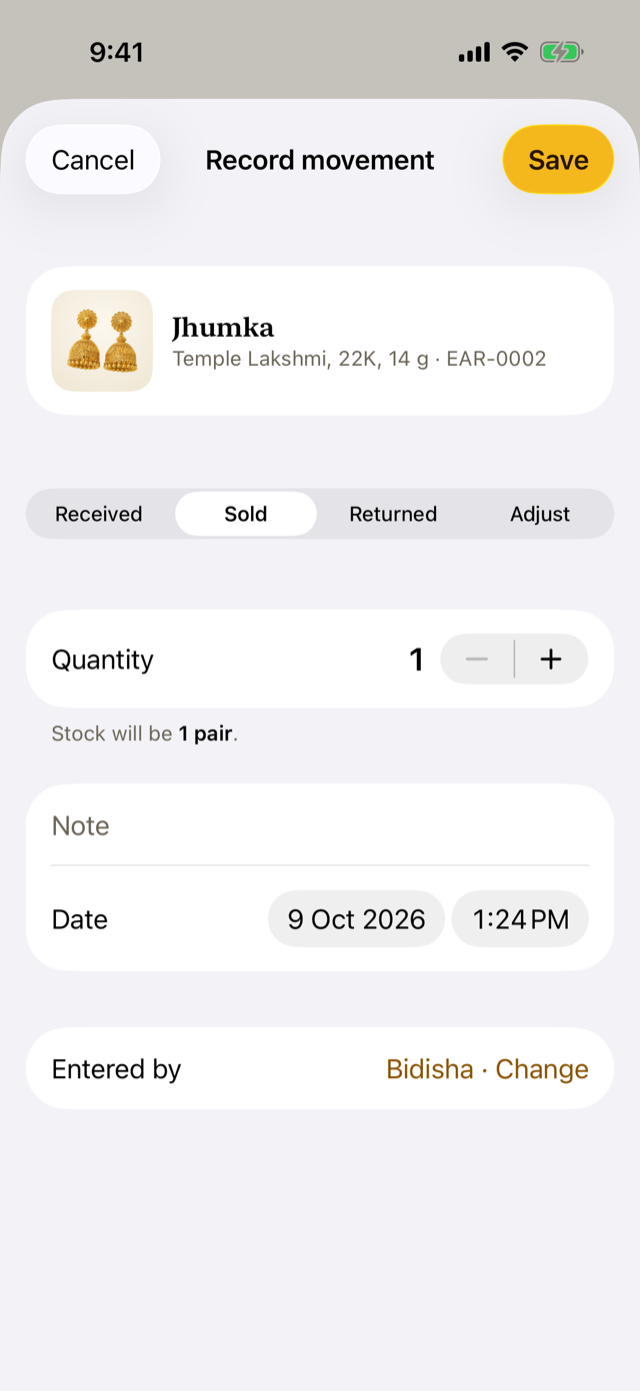
- Choose the kind: Received, Sold or Returned.
- Set the quantity.
- Add a note if it will help: the supplier, the bill number.
- Check the date and time. If the movement happened earlier, set when it happened; Jholok keeps both, and the ledger shows the day it was entered too. A date can’t be in the future.
- Entered by shows the owner. If someone else is entering it, tap Change, choose your name and enter your PIN. (It appears once People is set up.)
- Tap Save.
Below the quantity, Jholok shows what the stock will be, unless the product is being counted. If a sale would take it below zero, it says so, but lets you save: if the sale happened, record it, then count the product to find what’s missing.
Put a stock figure right
If a product’s stock is wrong for a reason you know (a piece damaged and sent for melting, say), open it, tap Adjust, and enter the correct stock. A reason is required. Jholok records the difference as an adjustment, with your reason, in the ledger.
In the demo, a chain (Rope, 22K, 18 in, 10 g) was taken out on 22 January: “Damaged on display, sent for melting”.
Adjust is turned off for a product while a count covers it, until the count is reviewed. Use the count to put its stock right instead.
Send stock out, and bring it back
Open the product and tap Send out. An approver or the owner signs it with their PIN.
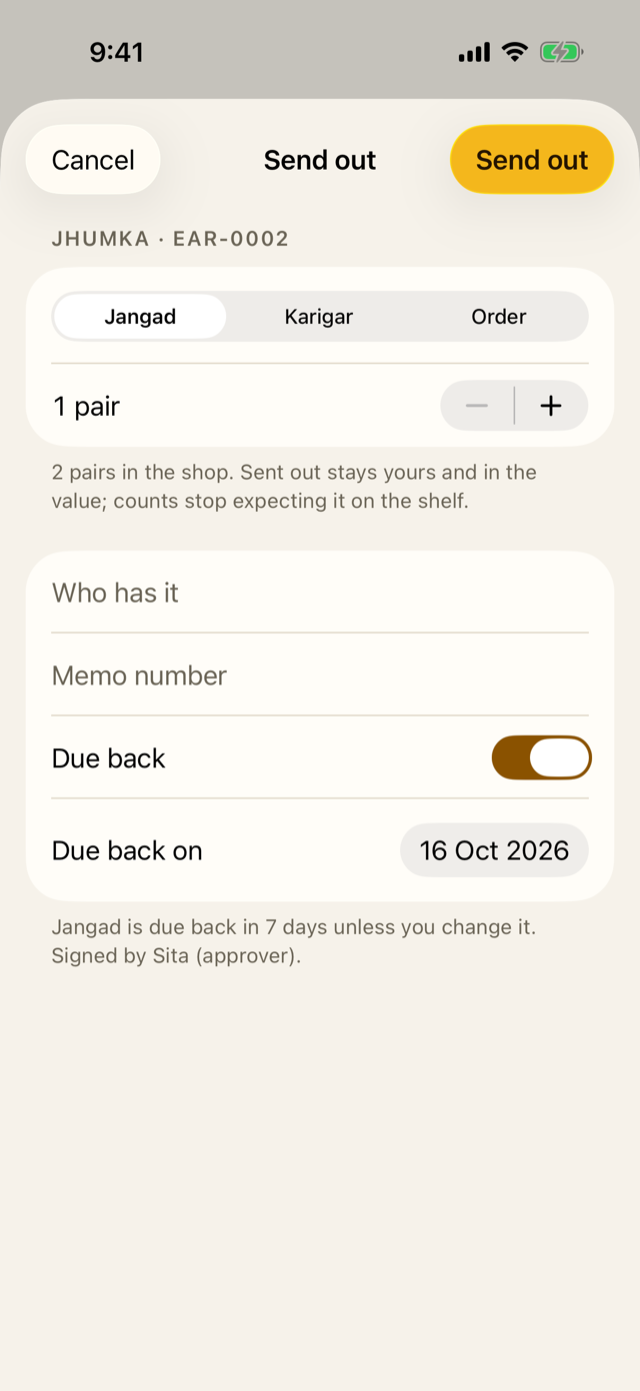
- To: Jangad, Karigar or Order.
- How many, or choose the pieces by their tags.
- Party: who has it, and Memo: the memo number.
- Due back: when it should come back. Jholok suggests 7 days for jangad and 30 for the karigar, and none for an order; change it if you agreed otherwise.
The product’s page then shows an Off the shelf section, with each memo, who has it and when it’s due. When the pieces come back, tap ⋯ beside the memo and choose Back in. If the customer keeps them, choose Sold from here. Both are signed by an approver or the owner.
A memo more than a week overdue appears under Needs attention on the Overview (Chapter 7).
6.3 Why it works this way
- A movement can’t be edited or deleted. A mistake is put right with another movement, usually an Adjust with its reason, so the ledger keeps the whole story (Chapter 2).
- The date is when it happened; Jholok also keeps when it was entered. A sale entered late still lands on the right day, and anyone can see it was entered late.
- A sale below zero is allowed. Refusing it would leave a real sale unrecorded. Jholok records the truth and points to the missing piece.
- Adjust waits while a product is being counted. Changing the ledger in the middle of a count would change what the count is checked against.
- Sending out needs an approver or the owner. Stock leaving the shop is when pieces go missing, so one of them signs for it, and every memo is logged.
6.4 How it works
Each movement stores its date, its kind, its quantity and note, who entered it and when it was entered. An Adjust stores the difference between the stock before and the correct stock you entered.
Sending out is two movements that add up to nothing: the stock leaves the shop and arrives at the place. So the stock the shop owns, and its value, don’t change, while the stock in the shop goes down. Back in moves it the other way. Sold from here records a sale from that place.
If you record a movement dated before a count that has already been completed, Jholok checks whether that count already accounted for it, so it isn’t counted twice. The owner confirms the correction, and a sale needs its bill number. Chapter 12 explains this.
6.5 Try it
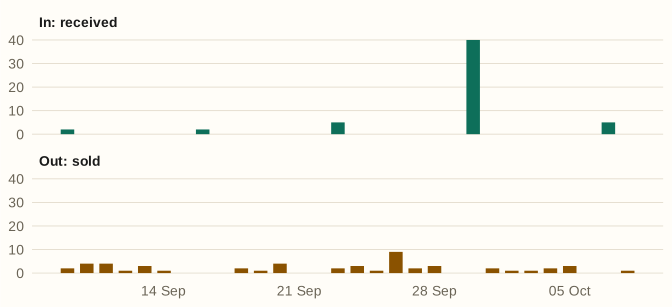
This is what came in and went out of Jholok Jewellers in the last 30 days, as the Ledger tab sums it up:
And this is the demo’s stock off the shelf:
| Product | Where | How many | Party | Memo | Due back |
|---|---|---|---|---|---|
| Jhumka, Antique, 22K, 8 g | Jangad | 2 pairs | Sharma Jewellers | 41 | 14 Oct |
| Chain, Rope, 22K, 18 in, 10 g | Karigar | 1 piece | Ramesh karigar | K-17 | 24 Sep |
| Bridal set, Kundan necklace and jhumkas, 22K, 85 g | Order | 1 set | Mrs Banerjee | O-208 | – |
The chain with the karigar was due back 14 days ago, so it is listed under Needs attention.
Question. A delivery of 3 pairs arrived on Monday, but you enter it on Wednesday. What date do you give it?
TipAnswer
Monday, when it arrived. Jholok keeps Wednesday too, as the day it was entered, and the ledger shows both.
- Record every delivery, sale and return, dated when it happened.
- A movement is never edited. Put a wrong figure right with Adjust, and give the reason.
- Adjust waits while the product is being counted.
- Stock on jangad, with the karigar or kept for an order is still the shop’s, but a count doesn’t expect it on the shelf. An approver or the owner signs it out and back.