2 The ledger: why stock is a sum
For everyone
- What the ledger is, and what a movement is.
- Why Jholok never lets anyone type in a stock number.
- What it means when stock goes below zero.
2.1 The idea
A ledger is a record of every change to the stock, oldest first. Each change is a movement. A movement says which product, when, and what kind of change it was. It also says how many: a plus number for stock coming in, a minus number for stock going out. It has a note, and the name of who entered it.
These are the kinds of movement you’ll meet first:
| Movement | What happened | Stock |
|---|---|---|
| Opening stock | The product was added to Jholok with stock already in the shop | goes up |
| Received | A delivery came in from a supplier or the karigar | goes up |
| Sold | A customer bought it | goes down |
| Returned | A customer brought it back | goes up |
| Adjustment | A correction outside a count, with a reason, such as a piece damaged and sent for melting | up or down |
| Count adjustment | A count found a difference and the approver accepted it (Chapter 3) | up or down |
There are a few more, for loading the shop’s billing records and for stock that leaves the shop for a while. Later chapters explain them.
Stock on hand is the sum of all a product’s movements. It works like a bank passbook: the balance is every deposit minus every withdrawal, and nobody writes in a new balance by hand.
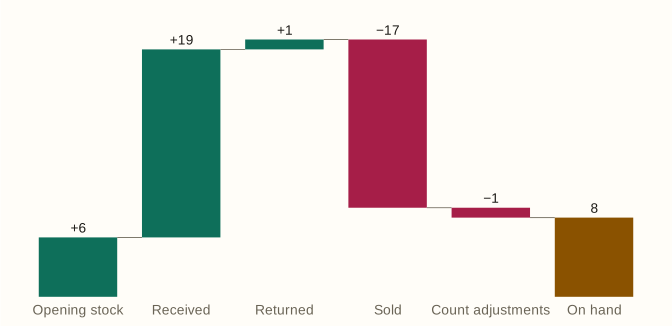
Here is the antique jhumka’s year. It opened with 6 pairs, 19 more were received, 1 was returned and 17 were sold. A count found one pair fewer than the ledger expected, and the approver accepted it. That leaves 8 pairs on hand. Two of them are out on jangad with Sharma Jewellers, so the product’s page shows 6 in the shop and 2 off the shelf: still the shop’s, but not on the shelf (Chapter 6).
2.2 In the app
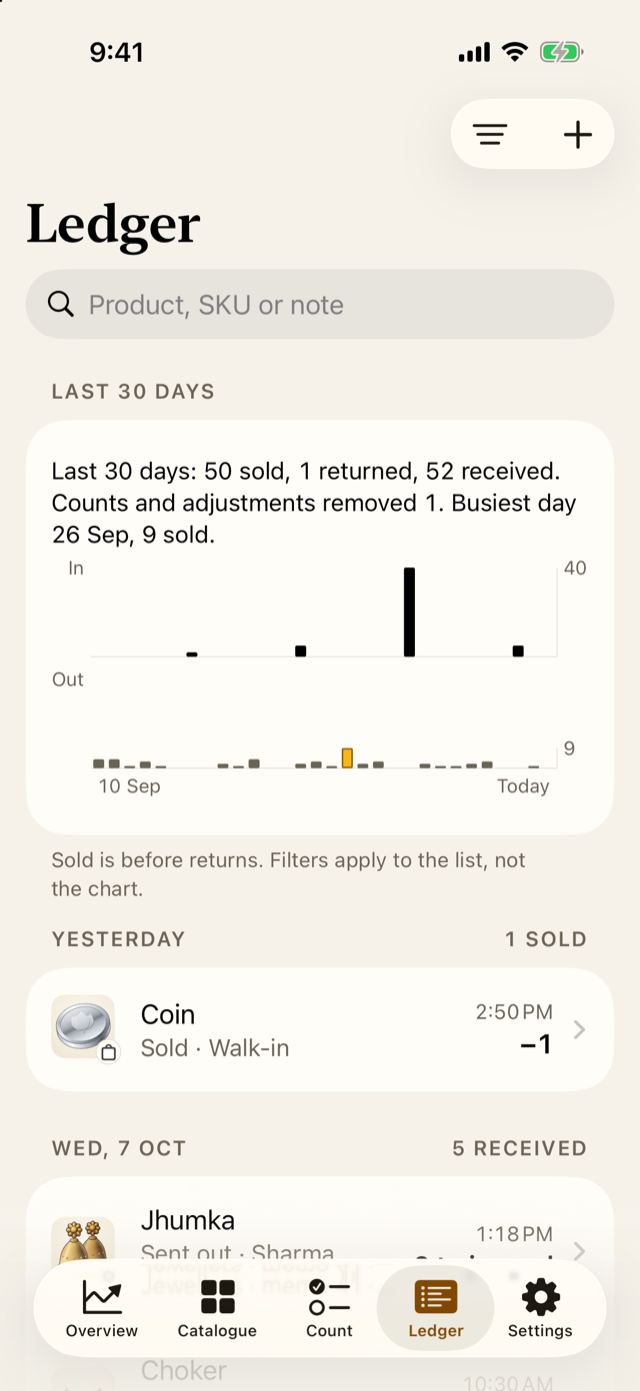
The Ledger tab lists every movement, newest first. At the top it sums up the last 30 days. In the demo shop that is 52 sold, 1 returned and 54 received.
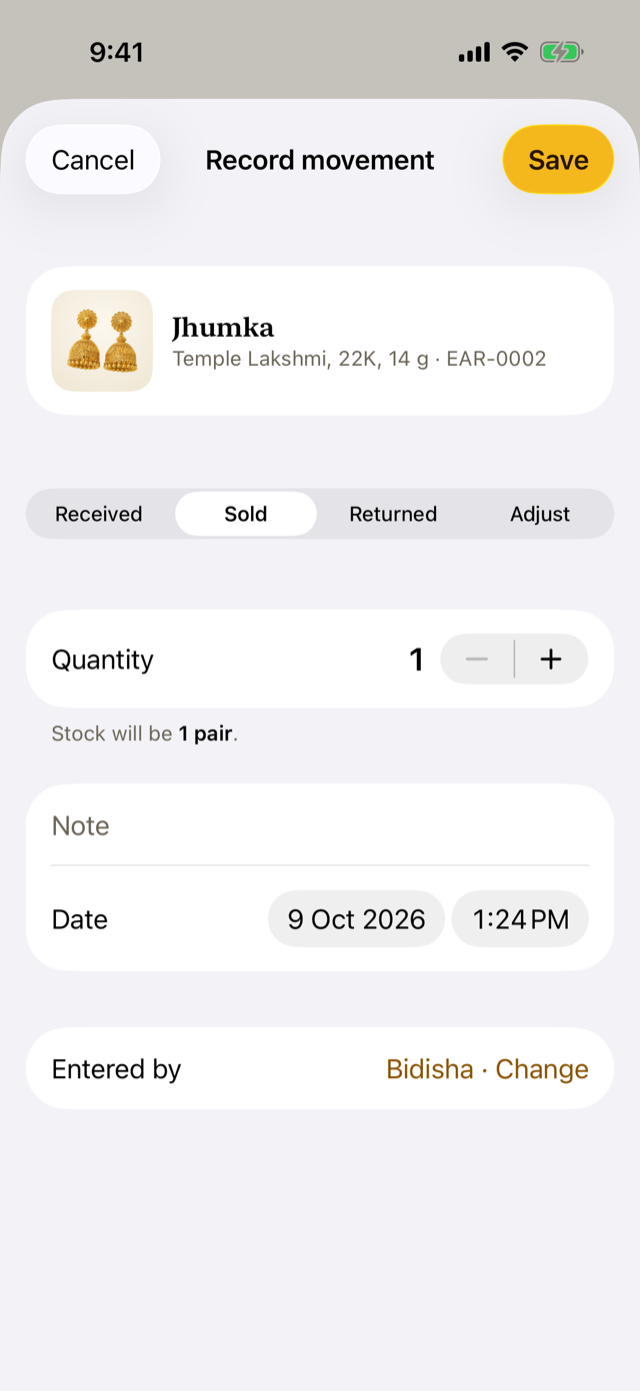
To record a movement by hand, open the product and tap Receive, Sell or Adjust. The kinds are also at the top of the screen, where you choose Returned for a customer’s return. For Received, Sold or Returned, enter how many. For Adjust, enter the stock you really have and a reason. Check the date: it should be when the movement happened, which may be earlier than when you enter it. Once People is set up (Chapter 4), Entered by shows the owner; anyone else taps Change and enters their PIN, so the ledger shows their name.
2.3 Why it works this way
Suppose someone could simply change the antique jhumka’s stock from 8 to 7. The missing pair would vanish without a trace: nobody could tell whether it was sold, lost, or a typing slip. With a ledger, every change has a date, a kind, a note and a name. The question “where did it go?” always has an answer to look up.
So a mistake is never erased. It is put right with another movement, and both stay in the ledger. This unbroken history is called an audit trail. It lets the owner, an accountant or an insurer check the stock long after the day.
2.4 How it works
Jholok stores movements, never stock numbers. Whenever a screen shows stock, Jholok adds up that product’s movements up to that moment. The same sums give the stock on any past date, which is how the Overview draws its charts.
When stock goes below zero
A shelf can’t hold fewer than nothing, so stock below zero always means a movement is missing or wrong. The Lakshmi pendant (NEC-0003) sold its last piece on 26 Sep. On 4 Oct another sale was entered, from a delivery of 6 that had arrived but hadn’t been entered yet. The ledger now says −1.
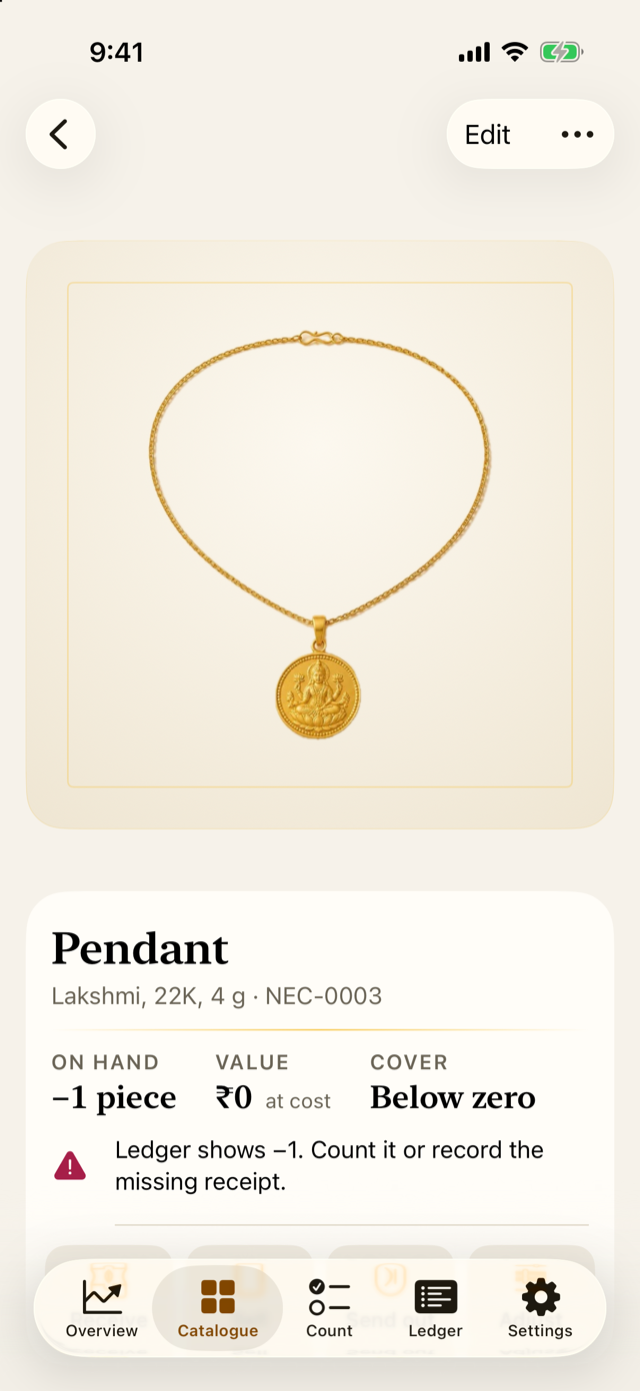
Jholok doesn’t hide this or round it to zero. It marks the product Below zero, lists it under Needs attention on the Overview, and suggests what to do: record the missing delivery, or count the product.
2.5 Try it
These are the antique jhumka’s last eight movements. The last column is the running total of the stock the shop owns: each row’s change added to the one before. Sending pairs out on jangad doesn’t change it, because they are still the shop’s.
| Date | Movement | Pairs | Note | On hand |
|---|---|---|---|---|
| 16 Jul 2026, 19:33 | Sold | −1 | Walk-in | 1 |
| 22 Jul 2026, 10:30 | Received | +3 | Supplier: Shree Gold Works | 4 |
| 29 Jul 2026, 10:30 | Received | +1 | Supplier: Shree Gold Works | 5 |
| 2 Aug 2026, 20:19 | Sold | −1 | Walk-in | 4 |
| 12 Aug 2026, 10:30 | Received | +1 | Supplier: Shree Gold Works | 5 |
| 26 Sep 2026, 10:00 | Count adjustment | −1 | Stock count · Showcase 1 · Monthly count. Shortages checked with Ramesh. | 4 |
| 30 Sep 2026, 10:30 | Received | +4 | Supplier: Shree Gold Works | 8 |
| 7 Oct 2026, 17:00 | Sent out | 2 to jangad | Memo 41 | 8 |
Question. A customer returns a ring they bought yesterday. How do you record it, and what happens to the ring’s stock?
TipAnswer
Open the ring, tap Receive, choose Returned at the top, and enter 1. Its stock goes up by one. The sale stays in the ledger too, so the history shows both: sold, then returned.
- Every change to stock is a movement in the ledger, with a kind, a date, a note and a name.
- Stock on hand is the sum of the movements. Nobody types in a stock number.
- Mistakes are put right with another movement, never erased.
- Stock below zero means a movement is missing. Find it, or count the product.